Home lab

Daily Digest

At 5:30 in the morning I can't be trusted with a phone. I pick it up to check the weather, and twenty minutes later I know a great deal about a stranger's kitchen remodel and nothing about the weather.

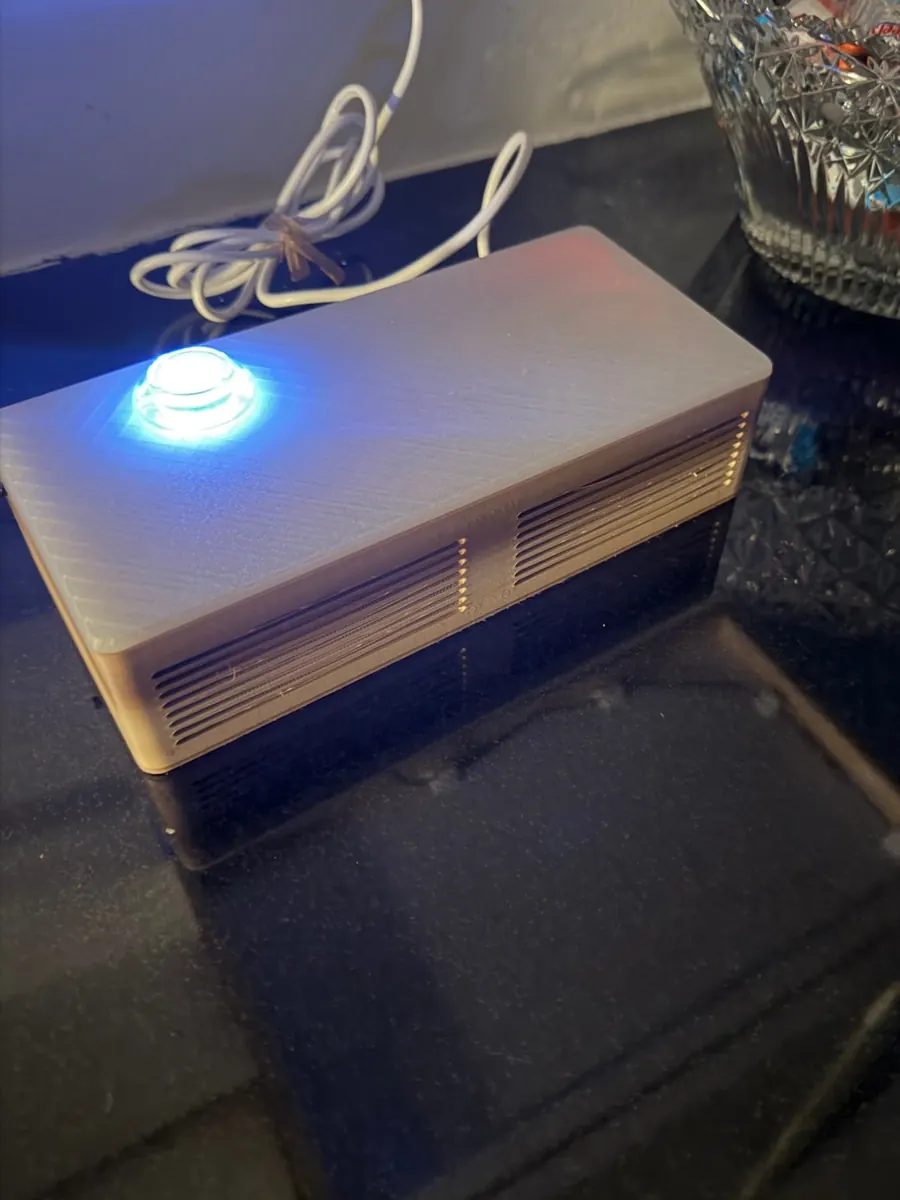
So the weather comes to me now. A Raspberry Pi 4 sits on the kitchen counter in a case I 3D-printed to look like a small soundbar. Every 15 minutes it builds one page that answers one question: what do I need to know today? When I press the button on top, say “Hey Jarvis,” or start the coffee maker, Claude turns that page into a short script and the Pi reads it to me while the coffee brews. No screen, no scrolling, no kitchen remodels.

It runs apart from the Pi rack, but it leans on it for what's happening inside the house.

Host: libertybowlPage: every 15 minutesBrief: ready by 4 AMWake phrase: Hey Jarvis
The daily digest box on a dark kitchen counter: a low, pale 3D-printed case with speaker grilles across the front and a round button glowing blue on top, next to a cut-glass bowl of candy.
Layout

What's in the box

ButtonTop
30 mm arcade button with an LEDThe only control on the case
Press to start or stopHold 5 s to shut downLED shows what it's doing
SoundFront
Two 5 W speakersBoth fire forward through the grille
USB sound cardTwo mics in the left wallVolume at 85%
PiInside
libertybowlPi 4B, 2 GB, microSD, Wi-Fi
Page builder (Python)Piper voiceopenWakeWordsystemd timersLogs in RAM
CaseShell
3D-printed soundbar210 × 98.5 × 52.4 mm, HTPLA
Two parts, no supportsVents on the back wallSolid top for spills
One power cable out the backWi-Fi, so no network cableRebuildable from one install script
Hostname

Named for a stadium, like the rest

The rack Pis are named for my teams' home grounds. This one stays in Memphis, a few miles from theforum and thepyramid.

libertybowlKitchen counter

Liberty Bowl

Memphis Tigers (NCAA football)

Memphis built it in 1965 to lure the Liberty Bowl game south from Philadelphia, where playing a bowl game outdoors in December had gone about as well as you'd expect. The Tigers have played there ever since. The sign has said Simmons Bank Liberty Stadium since 2022, and as with heinzfield, I'm sticking with the old name. A bowl that fills up with a little of everything once a day seemed like the right name for this job.

About the Liberty Bowl
Data path

How the day gets from the internet to me

One script gathers everything into a single file. The page and the spoken brief both read from that file, so they never disagree.

rebuilt every 15 minutes cache.json Weather, scores, newscalendars and home data too Page builderbuild.py, on libertybowl Daily pagehome network only Button, voice, coffeeall send the same request Brief writersummary.py Claude APIwrites the script Piper voiceread aloud on the Pi
Standard library and curl

The page builder is plain Python with no packages to install. ESPN's unofficial API turned away a Python client and happily answered curl, so every fetch goes through curl.

Stale beats blank

A section that fails to fetch keeps its last good copy and shows how old it is. One bad feed never takes down the page.

Two jobs, split up

Claude writes the words from the same facts the page shows. Piper, a voice that runs on the Pi, reads them out.

The page

What's on it

The page is only on the home network. It has two tabs: Daily, and a News feed.

SectionWhat it showsWhere it comes from
TodayThe short list: live games, weather alerts, rain, bad air, and a nudge to put the trash out tonightBuilt from everything below
OutsideToday's temperature, humidity, rain chance, and air quality, plus sunrise, sunset, and the moonOpen-Meteo, National Weather Service, Home Assistant
CalendarToday's events and the next five, merged from five calendarsiCal links
TeamsScores, next games, how to watch, and team newsESPN, Google News
TechHeadlinesHacker News, Techmeme, Ars Technica, The Verge
This day in historyOne factWikipedia
Inside todayAverage temperature, humidity, and air quality for each floor since midnightHome Assistant on cityground
Needs attentionWet leak sensors, low batteries, low printer ink, and any service that's down. Otherwise, “All clear.”Home Assistant, Uptime Kuma on heinzfield
HouseholdTrash day, recycling day, and this week's birthdaysA config file and the calendar
Family photosFour random scans with the names of the people in them, a new set every 15 minutesImmich on heinzfield
News feed tabLiberal and conservative headlines on the same topics, side by side. More on that below.Google News, limited to each side's outlets
Colors mean something

Readings show in the normal text color, yellow, or red, based on limits I set. Air quality uses the EPA's own category words, so “Moderate” means what the EPA means by it.

The same names as the frame

The photo captions come from the same Immich library as the photo frame. Name someone once and both places know them.

The News feed tab

Two sides, one screen

The same story can sound like two different countries depending on who's telling it. So the second tab sorts the day's political headlines by topic, with liberal outlets in one column and conservative outlets in the other.

TopicLiberal columnConservative column
White HouseTwo headlines per topic from The New York Times, The Washington Post, CNN, MS NOW, NPR, The Guardian, and NBC NewsTwo headlines per topic from Fox News, the New York Post, the Washington Examiner, National Review, The Daily Wire, The Washington Times, and the Daily Caller
Economy
Congress and elections
Courts
Immigration
World
Health
Energy and climate
Sorted by topic first

Each topic is a row, and each row has both columns. Reading across is the point. I see what each side chose to lead with on the economy before I move on to the courts.

How a headline gets in

For every topic and side, the Pi runs one Google News search. It's limited to that side's seven outlets, to the last 24 hours, and to stories with the topic's words in the headline. The top two make the page, each with the outlet's icon and a link to the article.

Easy to argue with

The topics, the search words, and which outlet sits in which column all live in one config file. If I decide I've put someone on the wrong side, it's a one-line fix. I expect opinions on this.

Read, not spoken

The morning brief skips this tab. Sixteen searches' worth of politics before coffee is how a person ends up back in bed. Reading both columns takes a minute and explains a lot of Thanksgiving dinners.

The spoken brief

Thirty seconds of what matters

The brief leads with today's weather, calendar, games, and last night's results. Then it stops talking.

Written at 4:00 AM

Claude writes the morning brief at 4:00 AM and Piper records it, so it's sitting there ready when I come downstairs. It starts almost the moment I ask, and it stays ready until 6:15. That costs about a penny and a half a day.

About 7 seconds the rest of the day

Later requests are written live. The Pi says “One moment” right away, because a voice has no loading spinner, then plays a soft ping each second and starts speaking as soon as Claude finishes its first sentence.

It apologizes

If a request fails, the Pi plays a clip it recorded at install: “Sorry, I couldn't get your summary. Try again in a few minutes.” A monthly spending limit on the API key means the worst case is that apology, not a bill.

Starting it

Three ways to ask

All three send the same request, so there's only one thing to keep working.

TriggerHow it worksWhen
The buttonPress to start, press again to stop. It works with wet hands or a full mug.Any hour
“Hey Jarvis”openWakeWord listens for the phrase, then a second check trained on my voice confirms it was me.5 AM to 9 PM
The coffee makerA smart plug measures its power. When the draw passes 500 watts, Home Assistant asks for the brief.5 to 7 AM, once a day
It kept hearing things

In the first two days it woke up four times while I was talking about something else, twice from another room. Raising the bar would have also blocked the real requests. So I recorded eight “Hey Jarvis” clips and two minutes of ordinary talk, and trained a small check on my own voice. No false wakes since.

The TV wins

With the TV on, it mostly can't hear the phrase at all. I tested it, thought about retraining, and decided to press the button instead. Not every problem needs software.

Coffee is the best trigger

I was going to start the coffee maker anyway. Idle, it draws under 1 watt. Brewing, about 1,300. The first cup starts the brief and a second cup stays quiet. More on that on the Pi rack page.

The button

One button, one light

With no screen, the LED in the button is the whole display.

LEDWhat it means
OffIdle
Slow pulseGetting data or writing the brief
SolidReading aloud
Quick flashSomething went wrong
A safe way to turn it off

Holding the button for 5 seconds shuts the Pi down cleanly. Pulling the plug on a microSD card mid-write is how you end up reflashing it. A press only acts on release, so the long hold never starts a brief first.

No extra parts

The LED runs straight from a GPIO pin at 3.3 volts. I had a transistor and a resistor on the list, and it turned out neither was needed.

Schedule

What runs, and when

WhenJobResult
AlwaysPage server, voice service, button service, and wake phrase listenerEach restarts on its own after a crash or a power cut
Every 15 minRebuild the pageFresh data and four new family photos
Every 60 sUptime Kuma on heinzfield checks the pageAn email if libertybowl goes quiet
4:00 AMWrite and record the morning briefAn instant brief until 6:15 AM
5:00 AMWake phrase turns on“Hey Jarvis” works until 9 PM
First cup, 5 to 7 AMCoffee maker starts the briefThe brief plays while the coffee brews
9:00 PMWake phrase turns offA quiet house. The button still works.
Resilience

When something goes wrong

A kitchen gadget that needs a keyboard is a failed kitchen gadget. These are the cases it handles on its own.

1
A feed is down

That section keeps its last good data and shows its age. The rest of the page carries on.

2
Claude can't be reached

The page keeps working, and a spoken request gets the apology clip.

3
The power goes out

I tested this by pulling the plug. The page, the button, the services, the timers, and the wake phrase all came back without help.

4
The SD card dies

There's no nightly backup, on purpose. Everything on the Pi comes back from the code and one install script. The only thing outside the code is one settings file.

Hardware

Specs that matter

PartDetailNote
Raspberry Pi 4B2 GB, microSD, Wi-FiAlready in a drawer. Logs live in RAM to spare the card.
CoolingHeatsink case with a fanThe fan turns on at 60°C. After back-to-back briefs with the lid on, the Pi reached 53.5°C, so it mostly rests.
SoundUSB sound card, 2 × 5 W speakersThe mics and speakers share one card, and it still hears the phrase over running water.
Button30 mm arcade, LEDWired with spade connectors and lever nuts. No soldering.
Case210 × 98.5 × 52.4 mmDesigned in OpenSCAD, printed in HTPLA. Every part fit on the first print, which has never happened to me before.
SoftwarePython 3, Piper, openWakeWordClaude writes the words. Everything else runs on the Pi.
New parts$72.79 with taxThe speakers, button, cooling, and wiring. The Pi and power supply were on hand.